
How to redeem your subscription
Users who bought a Spinsight Starter Kit during the beta phase before 15 October 2025 receive an email with a code (6 or 12 months of Team Pro subscription).
These are the step-by-step instructions for redeeming the subscription:
- Open the SPINSIGHT App on your iPhone and Log in with you SPINSIGHT account.
You can also use the web browser on your computer with this link. - Click the user icon in the top right corner.
- Select Settings in the dropdown menu.
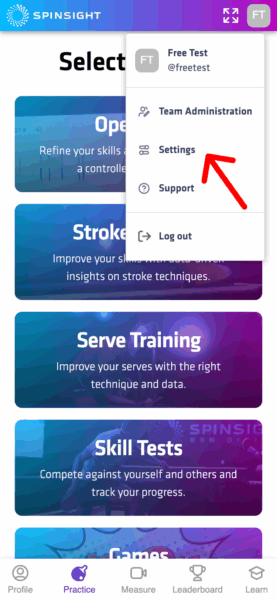
- Go to Subscription in section Account.
- Click Skip on the Starter Kit page.
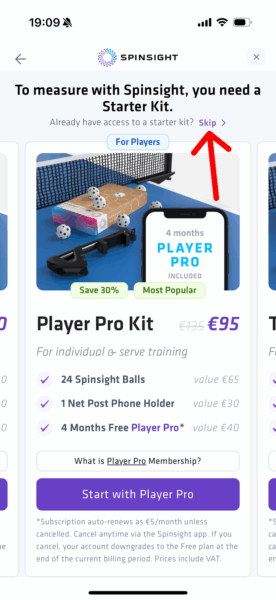
- On the subscription page Swipe left to Team Pro.
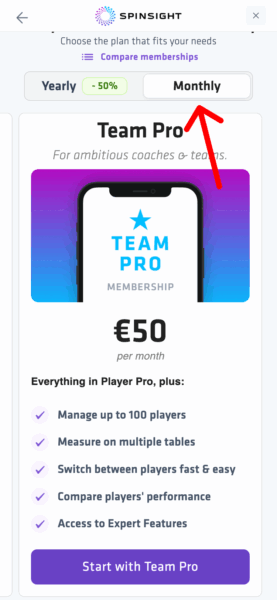
- Click on Monthly (you will get 6/12 months free).
- Scroll down and click button Start with Team Pro.

- Under Subtotal, select your country.
- Click Continue and it will open the Stripe Checkout page.
- It will now show the monthly subscription and you can click Add code / Add promotion code to open the input field.
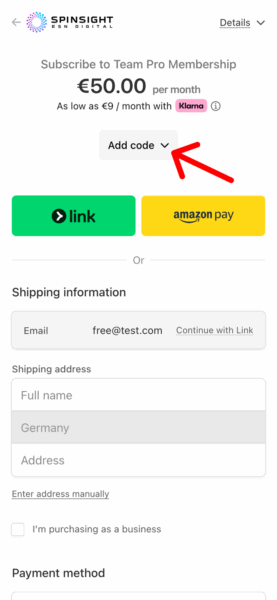
- Enter the Code you received in your email and confirm.

- Once the code is applied the price will be 0€.
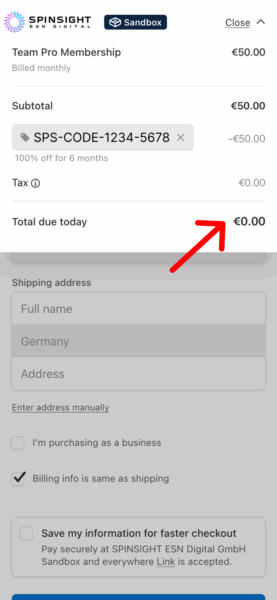
- Enter your full name and shipping address.
- Click button “Subscribe with obligation to pay” (you can cancel the subscription to the end of the monthly billing period).
- You’ll receive a confirmation email of your subscription.
- Your subscription has been activated, press Continue to start using it in your App.
You can always go back to Settings -> Subscription to check your subscription status and Manage your Subscription. There you can cancel it or switch between Player Pro and Team Pro subscription and between monthly and yearly payment.
Notes:
- You can use any email address for your SPINSIGHT account. It is not limited to the email used to buy the Starter Kit.
- If you bought multiple Starter Kits you will receive multiple codes.
If you run into problems, please contact our customer support at info@spinsight.com. Please mention the email address that you used in the shop to buy the Starter Kit before 15. October 2025 and the email address of your account in the SPINSIGHT App.